








Play Chicken Strike online, control an armed chicken, use guns and grenades, upgrade weapons, and survive colorful third-person shooter battles.
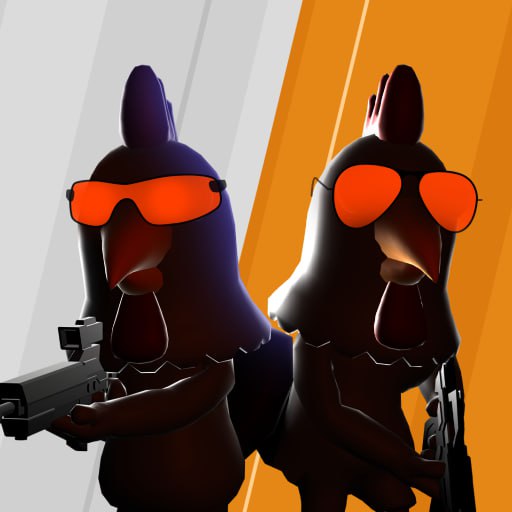
Here's a quick look at the game:
Chicken Strike is a 3D third-person shooter where you control an armed chicken and fight rival birds across compact battle arenas. You can run, jump, shoot, switch weapons, throw grenades, pick up guns, and improve your equipment as you work through fast combat encounters.
What Is Chicken Strike?
Chicken Strike mixes arcade shooting with a deliberately silly chicken theme. Instead of controlling a soldier, you enter each battle as a customizable bird equipped with pistols, rifles, shotguns, grenades, and other firearms.
The basic goal in Chicken Strike is to defeat opposing chickens while staying mobile enough to avoid incoming fire. Battles take place in colorful environments that include areas such as barns, desert arenas, and industrial-style coops, with objects and structures providing cover or alternate routes.
Despite looking like an online team shooter, available versions of Chicken Strike are listed as single-player and playable offline, so you should not assume the opponents are real players. The focus is on shooter-style battles against in-game enemies while improving your weapons and character customization.
Game Overview
| Feature | Details |
|---|---|
| Game | Chicken Strike |
| Genre | Third-Person Shooter |
| Perspective | Third Person |
| Graphics | 3D |
| Main Goal | Defeat rival chickens and survive gunfights |
| Weapons | Pistols, rifles, shotguns, grenades |
| Upgrades | Damage, fire rate, handling |
| Customization | Unlockable chicken outfits and skins |
| Main Controls | Keyboard and mouse |
| Browser Play | Yes |
| Mobile Support | Available on supported versions |
| Multiplayer | Not clearly listed; current versions are described as offline/single-player |
Chicken Strike keeps its mechanics closer to an arcade shooter than a realistic military game. Movement is quick, jumping is important, and switching equipment at the right moment can matter more than staying in one position.
How to Play Chicken Strike
The controls are straightforward, but good positioning makes a major difference. Running directly toward every enemy usually gives them an easy target, so use movement, jumping, cover, and weapon selection together.
Keep Moving During Gunfights
Use WASD to move around the arena and Space to jump. Chicken Strike encourages constant repositioning because standing still makes it easier for enemies to hit you.
Move sideways when exchanging fire instead of running directly toward an opponent. Jumping can also disrupt incoming shots, although repeatedly jumping without watching your landing position may leave you exposed.
Before entering an open area, look for walls, boxes, structures, or other objects that can break the enemy's line of fire.
Aim Before Committing to a Fight
The left mouse button fires your current weapon. If you have a sniper rifle, the right mouse button is used for aiming more precisely.
Do not keep firing when your target has disappeared behind cover. Conserving ammunition reduces the chance that you will need to reload at the worst possible moment.
In Chicken Strike, it is often better to reposition and regain a clear angle than to remain in an unfavorable firefight.
Switch Weapons for Different Situations
Chicken Strike includes several weapon types rather than forcing you to use one gun throughout every battle.
Use 1 and 2 to switch between your equipped weapons. A rifle can be useful for general combat, while a shotgun is better suited to close-range encounters. Sniper weapons reward distance and careful aiming.
If you find another weapon during a battle, press F to pick it up or select it when the game allows.
Learning when to change guns is one of the easiest ways to improve your performance in Chicken Strike.
Use Grenades Against Groups and Cover
Grenades give you another way to pressure enemies who are difficult to hit directly. Use 3 and 4 to select available grenades, then use the left mouse button to throw them.
Avoid throwing grenades randomly. Save them for groups, narrow areas, or opponents staying behind cover.
The explosion can force enemies out of safer positions, giving you a better opportunity to finish the fight with your main weapon.
Chicken Strike Controls
| Action | Control |
|---|---|
| Move | WASD |
| Jump | Space |
| Shoot | Left Mouse Button |
| Throw Grenade | Left Mouse Button when grenade is selected |
| Aim with Sniper Rifle | Right Mouse Button |
| Reload | R |
| Switch Weapons | 1, 2 |
| Select / Pick Up Weapon | F |
| Select Grenades | 3, 4 |
| Pause | P |
| View Leaderboard / Scoreboard | Tab |
Chicken Strike is easiest to control when you keep one hand on WASD and use the mouse continuously for camera movement and aiming.
Get comfortable switching weapons without looking at the keyboard. Faster weapon changes become useful when an enemy suddenly closes the distance.
Weapons and Upgrades
Weapon progression is an important part of Chicken Strike. Available guns include pistols, rifles, shotguns, and sniper-style weapons, while grenades provide explosive damage.
Weapons can be improved in areas such as damage, fire rate, and handling. The exact upgrade you should prioritize depends on how you prefer to fight.
Higher damage helps each successful hit matter more. Fire-rate improvements can make automatic weapons more aggressive, while handling upgrades can make a gun easier to control during repeated engagements.
Do not judge a weapon only by raw damage. A powerful weapon that is difficult to use at your preferred distance may be less useful than a reliable gun you can consistently hit with.
Maps and Positioning
Chicken Strike features colorful battle environments instead of one repeated arena. Locations include neon-styled barns, desert battlefields, and industrial chicken-coop areas.
The layouts contain cover positions and shortcuts, so learning the map can be almost as valuable as upgrading your gun.
When entering a new arena, identify open spaces first. Crossing the middle of an exposed area can make you vulnerable from several directions. Moving around the edges or using structures as cover gives you more control over which enemies can attack you at once.
Shortcuts can also help you escape a bad fight or approach an enemy from another angle.
Character Skins
Chicken Strike lets you customize the appearance of your bird with unlockable outfits. Examples include themes such as Sniper Chick and Cowboy Cock.
These skins give your character a different visual style, but the main gameplay remains focused on shooting, movement, weapons, and upgrades.
If you are saving in-game currency or rewards, decide whether you want faster combat progression or cosmetic unlocks before spending everything immediately.
Tips for Better Chicken Strike Battles
- Strafe while shooting. Moving sideways makes you harder to hit without forcing you to turn away from your target.
- Reload behind cover. Pressing R in the middle of an open firefight can leave you unable to respond.
- Match your weapon to the range. Shotguns favor close encounters, while rifles and sniper weapons are more useful when you have distance.
- Do not waste grenades. Use them when enemies are grouped together or hiding around a predictable position.
- Keep jumping under pressure. A well-timed jump can help you avoid shots and move to another piece of cover.
- Pick up useful weapons. Watch for equipment you can collect with F instead of relying only on your starting loadout.
- Learn each arena. Knowing shortcuts and cover positions makes repeated Chicken Strike battles much easier to control.
- Upgrade weapons you actually use. Spreading resources across every gun can be less effective than improving a reliable loadout first.
How to Survive Longer
Survival in Chicken Strike depends heavily on avoiding unnecessary damage. Winning one fight with almost no health left can put you in a poor position for the next encounter.
Use cover before your health becomes critical. If several opponents are attacking from different directions, move away rather than trying to eliminate all of them from the same position.
Also pay attention to your ammunition. Reloading after a fight is usually safer than discovering an empty magazine when the next enemy appears.
As you become more familiar with Chicken Strike, try combining movement with your shooting instead of treating them as separate actions. Strafe, jump, aim, and change weapons while continuously tracking where enemies are located.
Can You Play Chicken Strike Online?
Yes. Chicken Strike can be played directly in a supported web browser, and current releases are also available on mobile devices.
The important distinction is that playing Chicken Strike through a website does not necessarily mean it is a live online multiplayer game. Current platform information describes the game as supporting offline or single-player gameplay, so battles can use in-game opponents rather than other people connected to a server.
No separate desktop installation is required when using a supported browser version.
Why Players Keep Playing Chicken Strike
Chicken Strike works well for short shooter sessions because the basic controls are immediately familiar: move, jump, aim, fire, and switch weapons.
The chicken characters give the game a less serious visual style, while weapon upgrades provide a reason to keep improving your equipment. Different arenas also encourage you to learn cover locations and better routes instead of fighting every battle in exactly the same way.
If you enjoy third-person shooters but prefer straightforward arcade combat over complicated tactical systems, Chicken Strike gives you plenty to work on without requiring a long tutorial.
FAQ
What type of game is Chicken Strike?
Chicken Strike is a 3D third-person shooter where armed chickens fight opponents using guns, grenades, movement, and weapon upgrades.
How do you shoot in Chicken Strike?
Use the left mouse button to fire your weapon, and use the right mouse button when aiming with a sniper rifle.
How do you reload?
Press R to reload your current weapon.
Can you switch weapons?
Yes. Press 1 or 2 to change weapons, while F is used for weapon selection or picking up available guns.
Is Chicken Strike multiplayer?
Current listings describe Chicken Strike as an offline or single-player shooter, so live multiplayer should not be assumed.
Can you play Chicken Strike on mobile?
Yes. Current versions support mobile and tablet play in addition to desktop browser gameplay.