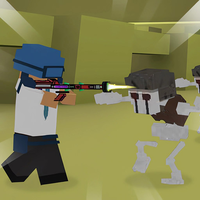







Merge weapons, assemble custom guns, and shoot vehicle-riding zombies and bosses in Zombie Rage: Merge 3D.
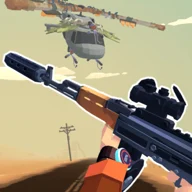
Here's a quick look at the game:
Zombie Rage: Merge 3D combines weapon upgrading with 3D shooting. You fight as Grandpa against zombies that can shoot and use vehicles, while stronger weapons come from merging identical guns and building customized firearms with different parts. :contentReference[oaicite:0]{index=0}
Build Better Weapons Before the Next Fight
Weapon progression is a central part of Zombie Rage: Merge 3D. Identical weapons can be merged into stronger versions, giving you more firepower as the zombie attacks become tougher. The game also includes a weapon assembly system for installing components such as barrels, stocks, handles, sights, silencers, and compensators. :contentReference[oaicite:1]{index=1}
These systems make upgrading part of the combat loop rather than a separate cosmetic feature. Improving the arsenal matters because later opposition includes more than ordinary zombies, with motorcyclists, shooters, giants, jeep-mounted enemies, and larger boss threats. :contentReference[oaicite:2]{index=2}
Stop the Zombie Pursuit
The main objective is to destroy the enemies pursuing Grandpa. Encounters can include zombies attacking from motorcycles and jeeps, while boss battles introduce threats such as zombie trains, helicopters, armed jeeps, and drones. Locations also change as the campaign moves from desert areas to battles at sea. :contentReference[oaicite:3]{index=3}
Enemy variety makes weapon management important. On PC, four numbered weapon slots let you switch between available guns during combat, while the reload command gives you direct control over when to refill the current weapon. :contentReference[oaicite:4]{index=4}
Shooting Controls
On PC, move the mouse to control your aim. Use the left mouse button to shoot and the right mouse button to use the sight. Press 1, 2, 3, or 4 to switch weapons, and press R to reload. :contentReference[oaicite:5]{index=5}
On mobile, move your finger on the touchscreen to aim. Shooting starts automatically, so the main input is keeping your aim on the zombie or vehicle you want to attack. :contentReference[oaicite:6]{index=6}
Handling Bigger Threats
Ordinary shooters and motorcycle zombies are not the only targets. Giants and vehicle-based enemies add heavier threats, while trains, helicopters, jeeps, and drones appear as bosses. Since PC players can carry and switch among four weapon slots, keeping track of the selected gun before a major target arrives prevents an unnecessary weapon change in the middle of the attack. :contentReference[oaicite:7]{index=7}